For the last two months I have been working on some genuinely interesting projects that involve Azure AI Foundry. And Foundry is amazing. But have you ever actually tried to manage it?
You get an API key for each model. And if you are running multiple teams that sit on your head asking for a Gemini model here, a text embedding model there, three keys from three different LLM families over there, then you already know my pain.
This is where LiteLLM comes in. It is such an elegant solution to this problem that I genuinely cannot stop talking about it. It serves as a gateway in front of all my Azure Foundry services. One place to go, one production platform that serves every team and all the overhead that comes with them.
So let me walk you through what that actually looks like, because the more I run it, the more I think every team doing serious work on Foundry should be running something like this.
The mess before the gateway
Here is what happens if you do not have a gateway.
Someone needs GPT-4o, so they go into Foundry, grab the endpoint and the key, and paste it into a .env. Fine. Then another team needs an embedding model, so they get a second key. Then a third team wants Phi or Mistral from the model catalog, and that is a third endpoint with a third key. Now multiply that by every team in the org.
Suddenly you have a pile of raw Foundry keys living in random .env files and pipeline secrets. Nobody knows who is spending what. There is no limit on anything, so one agent stuck in a retry loop can quietly burn through your budget overnight and you only find out when the invoice lands. And the day one of those keys leaks, you rotate it and pray you did not just break four other workloads that happened to share the same deployment.
That is the trap. A raw Foundry key is all or nothing. You cannot scope it, you cannot cap it, and you cannot kill one without collateral damage. The whole job of a platform team is to make the right thing the easy thing, and a pile of shared keys is the opposite of that.
One gateway, every model behind it
LiteLLM sits in front of Foundry and gives you a single OpenAI compatible endpoint. Your teams stop talking to Foundry directly. They talk to LiteLLM, and LiteLLM talks to Foundry on their behalf.
The way you teach it about your models is a config file. You list every deployment once, give it a friendly name, and point it at the right Foundry endpoint. Here is the part that solves the three families problem from the start of this post:
model_list:
  # OpenAI family on Foundry uses the azure/ prefix
  - model_name: gpt-4o
    litellm_params:
      model: azure/gpt-4o-deployment
      api_base: https://my-foundry.openai.azure.com/
      api_key: os.environ/AZURE_API_KEY
      api_version: "2024-10-21"

  # Everything else in the Foundry catalog uses azure_ai/
  - model_name: phi-4
    litellm_params:
      model: azure_ai/phi-4-deployment
      api_base: https://my-foundry.services.ai.azure.com/
      api_key: os.environ/AZURE_AI_API_KEY

  # Embeddings, same idea
  - model_name: text-embedding-3-large
    litellm_params:
      model: azure/text-embedding-3-large-deployment
      api_base: https://my-foundry.openai.azure.com/
      api_key: os.environ/AZURE_API_KEY
Notice the two prefixes, because this part trips people up. The OpenAI style deployments like GPT and the embedding models go through azure/. The rest of the Foundry catalog, your Phi, Mistral, Llama, and friends, go through azure_ai/. LiteLLM handles the translation for each one, so the team calling it never has to know or care which family they are hitting. They just ask for gpt-4o or phi-4 by the friendly name and it works.
That is the whole trick. Three model families, three different endpoint shapes, three API keys, all collapsed into one endpoint and one name per model. The mess stays on my side of the gateway, where I can actually manage it, instead of spreading across every team’s codebase.
Virtual keys, or the part that makes everything else possible
Once everything routes through one place, I stop handing out the real Foundry keys at all. Instead, every team gets a virtual key.
A virtual key is not just an alias. It is a scoped credential with rules attached to it. I can say this key is only allowed to call these two models. I can say this key gets this much budget per month. I can say this key is limited to this many requests and tokens per minute. And I can revoke it whenever I want without touching anything else.
curl -X POST "https://litellm.mycompany.com/key/generate" \
  -H "Authorization: Bearer $LITELLM_MASTER_KEY" \
  -H "Content-Type: application/json" \
  -d '{
    "key_alias": "team-search",
    "models": ["gpt-4o", "text-embedding-3-large"],
    "max_budget": 200,
    "budget_duration": "30d",
    "tpm_limit": 100000,
    "rpm_limit": 500
  }'
The real Foundry keys now live in exactly one place, the gateway, and nobody on any team ever sees them again. This one change is what makes budgets and key rotation almost free, which is the whole point of this post.
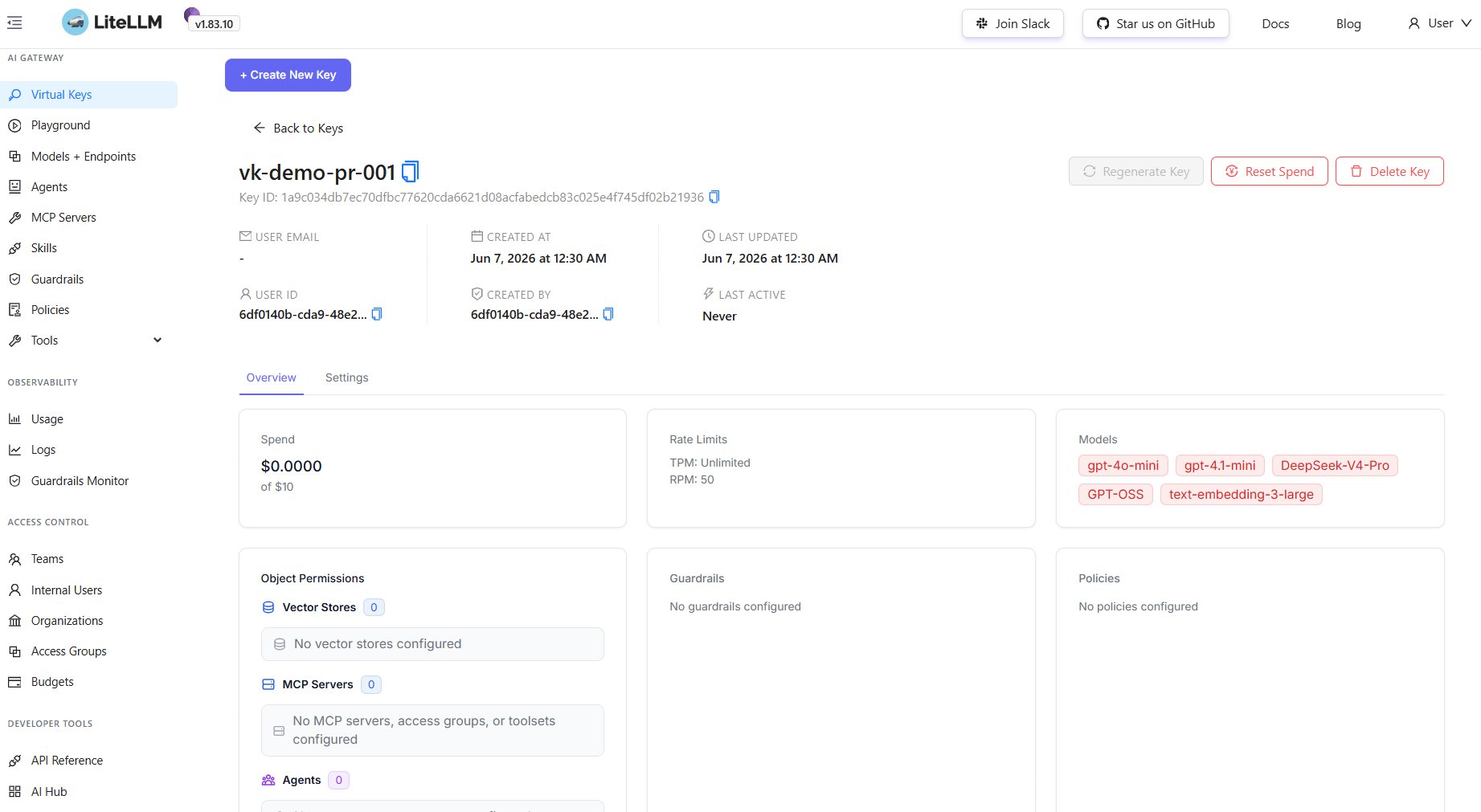
Here is what one of these keys looks like in the LiteLLM UI. You can see the whole scope at a glance: the spend against its budget, the rate limits, and the exact list of models it is allowed to touch. Nothing about the real Foundry endpoints anywhere in sight.
Budgets that actually stop the spend
That max_budget line is the one that changed how I sleep.
Let me tell you why I care about it so much. Before the budgets were locked down, a guy on one of the teams burned through 35 dollars in two hours. Two hours. He had wired up an agent, left the retry logic looping, and walked away from his desk. No malice, no dramatic mistake, just a loop doing exactly what loops do. And 35 dollars does not sound like anything until you sit down and do the math on what that becomes over a weekend, across a dozen teams, with nobody watching the meter.
LiteLLM tracks spend per key in Postgres on every single call. When a key crosses its ceiling, the gateway just stops serving it. So that same runaway loop is no longer an org wide problem. It hits its own team’s budget, gets an error back, and stops there. The guy would have hit his cap, gotten a clear error in the response, and pinged me about it instead of quietly draining the bill while he was at lunch. The blast radius is one team, capped at a number I picked in advance.
This is the part that sells the whole platform when I explain it to people. Every team has a hard spend ceiling. The platform enforces it automatically. And you can finally see exactly which team spent what, instead of staring at one giant Azure line item with no way to break it down.
It also nests, which is the setup you actually want. You can set one org wide cap, say two thousand a month total, then carve that into per team slices underneath it. Spend rolls up automatically. So a single team can blow its own slice without ever putting the whole org over its ceiling, and you get both views at once: the big number at the top and the per team breakdown you need to chase down whoever is being expensive this week.
A few things I learned the hard way running this:
- Budgets reset on a duration, not a calendar month. I assumed
budget_duration: "30d"lined up with the month. It does not. It rolls thirty days from when you made the key, so my numbers never matched the Azure invoice until I figured that out. If you want clean monthly reporting, plan around it or reconcile in your observability tool later. - Use soft limits, not just hard walls. You can set a
soft_budgetthat fires an alert without blocking the team. Wire that to Slack or Teams at around eighty percent. I skipped this at first and the result was a team hitting a hard wall with zero warning, then an annoyed message in my DMs. A heads up at eighty percent would have saved both of us the trouble. - The Postgres is not a throwaway sidecar, even though it looks like one. I treated it like one at first. Then it had a bad day, and because every virtual key and all the spend tracking lives in it, the budgets and the auth went down with it. Back it up and give it real resources like you would any other production database, because that is exactly what it is.
- Pin your image tag. Do not run
latest. LiteLLM ships fast and a proxy that sits in front of every team’s AI access is not the place you want a surprise. Pin a known good version, read the changelog before you bump it, and test the bump somewhere that is not production. Boring advice right up until the day it saves you.
Rotating keys without a fire drill
Spend is one half of why I run this. Leaks are the other.
A key will leak eventually. It ends up in a notification preview, a screenshot in a ticket, a log line that should have been scrubbed. When that happens with a raw Foundry key, rotation is a whole project. You generate a new one in the Azure portal, hunt down every place the old one lives, redeploy all of them, and hope you did not miss one. Meanwhile the leaked key is still live and still billable.
With a LiteLLM virtual key, rotation is a couple of clicks.
LiteLLM ships with an admin UI, and this is where it really shines for day to day work. If a key leaks, you delete it, mint a fresh one with the same scope, and hand it to the one team that owns it. The whole thing takes about as long as it sounds.
The leaked key is dead the second you revoke it. And here is the important bit: the real Foundry credentials never moved. They are still sitting in the gateway where they always were, completely untouched, because the thing that leaked was never the real key in the first place. Nothing else in the org even notices.
That is the entire argument for the gateway. A raw key leak is an incident. A virtual key leak is a thirty second task and a note in the channel.
But the part I actually love is that you do not have to wait for a leak to rotate. Open a key’s settings and you can turn on auto rotation.
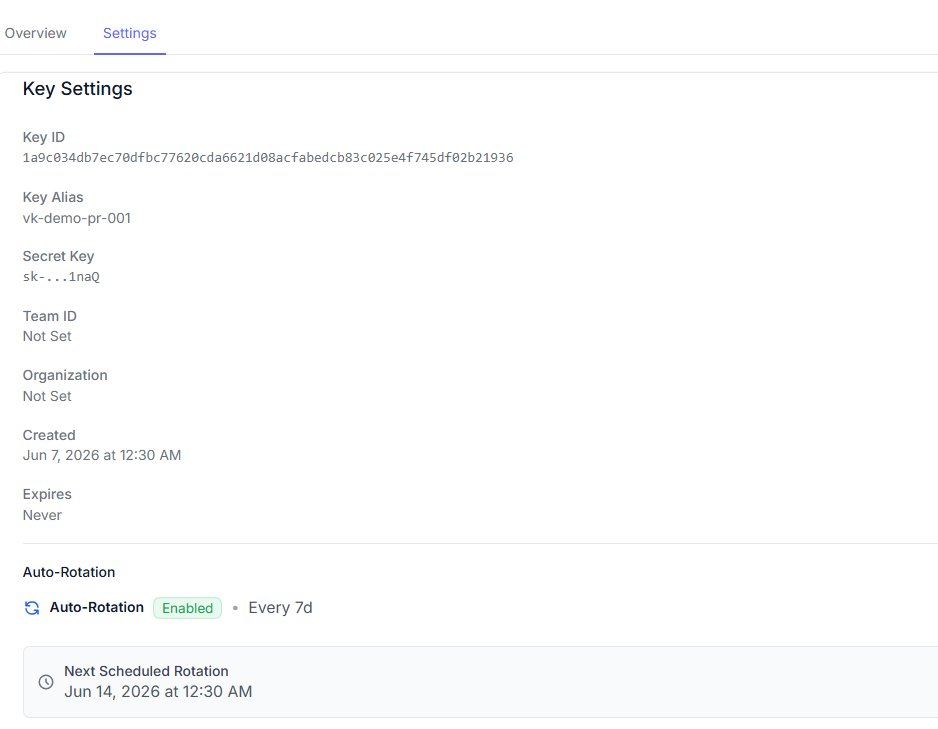
Flip it on, set the interval, and LiteLLM rotates the key on that schedule by itself. The one in the screenshot rolls every seven days and already knows its next rotation date. No cron job, no script, nobody remembering to do it. The key just quietly replaces itself on a timer, which is exactly the kind of thing you want to be automatic instead of a calendar reminder you will eventually ignore.
The Azure trick that makes this even cleaner
Because I am running all of this on AKS, I get one more thing for free, and it is my favorite part.
Instead of stuffing those real Foundry keys into the config at all, I let LiteLLM authenticate to Foundry with a managed identity. The pod gets its own Azure identity, I grant that identity the right role on the Foundry resource, and the real API key disappears from my config completely. I expected this to be fiddly. It was not, which honestly surprised me more than it should have.
model_list:
  - model_name: gpt-4o
    litellm_params:
      model: azure/gpt-4o-deployment
      api_base: https://my-foundry.openai.azure.com/
      # no api_key at all, LiteLLM uses the pod's Azure identity
      api_version: "2024-10-21"
LiteLLM uses Azure’s DefaultAzureCredential under the hood, so on AKS it just picks up the workload identity automatically. Think about what that means. There is no Foundry secret to leak, because there is no secret. The only credentials anyone ever handles are the virtual keys, and those are scoped, capped, and killable in one call.
So now the security story is dead simple. The dangerous thing, real access to Foundry, lives only in the cluster identity and never travels anywhere. The cheap thing, the virtual key, is the only thing humans ever touch, and if one leaks I rotate it before my coffee gets cold.
The actual point
Budgets and key rotation feel like two separate features when you read the docs. They are not. They are the same idea, which is that you should never hand anyone direct access to a metered, expensive, dangerous resource. You give them a scoped handle to it instead, one you can cap, watch, and revoke without ever touching the thing underneath.
Azure AI Foundry gives you incredible models. LiteLLM is the layer that makes them safe to actually hand out across an org. The runaway loop hits a budget wall instead of a wall of money, the way that 35 dollar afternoon never could have. The leaked key dies in one call instead of one long afternoon. And the real Foundry access sits quietly in the cluster identity, doing nothing more exciting than existing.
That is the boring infrastructure that holds the whole thing together. And boring is exactly what you want from the part of the stack that touches the bill.
Running one, or stuck mid-migration? Come yell at me — GitHub / LinkedIn.