For the last few months I have been running MLflow in production on our AKS cluster. And MLflow is incredible. But have you ever actually tried to run it at scale?
You get a Helm chart. You get a database. You get blob storage. And then you realize the chart knows nothing about your Key Vault, your Workload Identity, your Traefik ingress controller, or your certificate management. The community chart is great for a demo. Production is different.
This is where the layered approach comes in, and the more I run it the more obvious it feels. Instead of fighting the community chart or forking it, you layer your own infrastructure chart on top. One place for the open source stuff, one place for your cloud specific details, and ArgoCD orchestrates them together.
So let me walk you through what that actually looks like, because the more I run it, the more I think every team doing serious work with MLflow should be running something like this.
The mess before MLflow
Here is what happens if you do not have a proper MLflow setup.
Someone needs to train a model, so they run a notebook locally, log some metrics, and push the model somewhere. Where somewhere might be an S3 bucket, a git tag, maybe a Slack message to the team. Then another team member trains a different version of the same model. Now you have two versions somewhere in the fog, and nobody knows which one is actually production. You cannot reproduce the first version because the training data is gone. You cannot debug which version caused the issue because you never logged which version was deployed when.
Suddenly you have model versions living in random places. Nobody knows the lineage. There is no audit trail. If you get audited or need to prove which model was used for a decision on a particular day, you are stuck.
That is the trap. A model without versioning is all or nothing. You cannot reproduce it, you cannot debug it, you cannot prove it existed. The whole job of a platform team is to make the right thing the easy thing, and a pile of unnamed model files somewhere is the opposite of that.
MLflow sounds easy locally, but…
MLflow works beautifully on your laptop. You run mlflow ui, log your experiments, and everything is there. Fine.
Then you try to run it in production. You need a Pod. You need a Service. You need a database to store metadata (experiments, runs, model versions, tags, scores). You need blob storage to store the actual model files. You need TLS so teams can access it securely. You need ingress routing so it is reachable by name, not IP. You need secret management so you are not pasting database passwords into YAML files.
The community-charts/mlflow Helm chart handles the Pod and the Service. It even knows how to connect to a PostgreSQL database and Azure Blob Storage. That part is great.
But it does not know about your Azure Key Vault. It does not know that you want secrets injected via External Secrets Operator, not stored in plaintext. It does not know that you are using Traefik for ingress, not the standard Kubernetes Ingress. It does not know that you want pod authentication via Azure Workload Identity, not API keys. It does not know about cert-manager or TLS certificates.
Those are not flaws in the community chart. They are choices. The chart is cloud agnostic on purpose. Your production environment is not.
The solution: layers, not forks
Instead of forking the community chart or fighting it into submission, you layer your own infrastructure chart on top. You keep the separation clean.
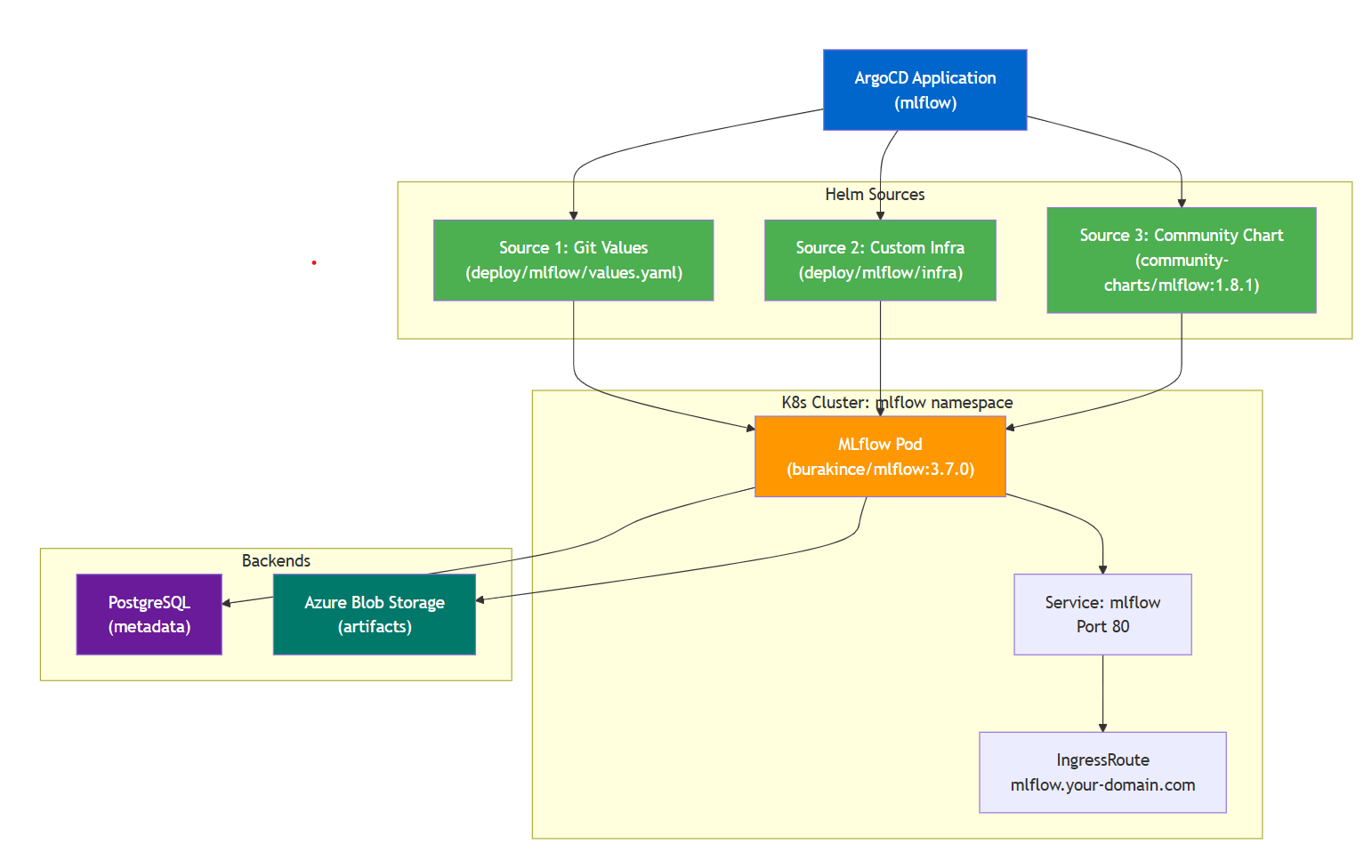
Layer 1: Community chart (the MLflow binary). The public community-charts/mlflow:1.8.1 chart. This is just MLflow itself, packaged to run on Kubernetes. You point it at a Postgres database and a blob store and it serves the tracking server. That is the whole job of this layer, and it is the part you never want to fork or fight.
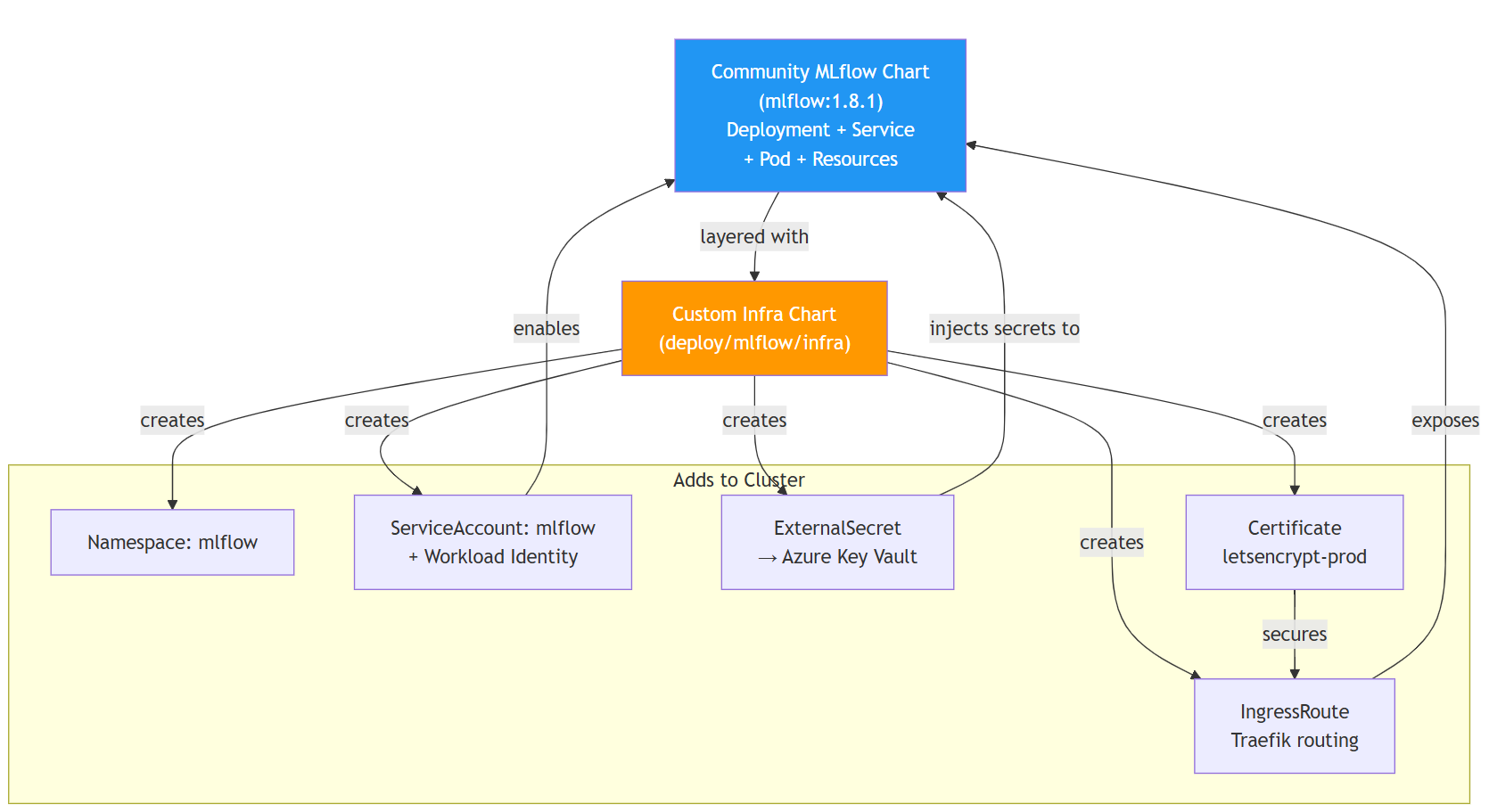
Layer 2: Custom infra chart (your cloud specific setup). Your own chart at deploy/mlflow/infra/ that creates five things:
- Namespace:
mlflow - ServiceAccount:
mlflowwith the annotationazure.workload.identity/client-id, plus the pod labelazure.workload.identity/use: "true", so the pod can authenticate to Azure - ExternalSecret: pulls the database password from Azure Key Vault and injects it as a Kubernetes Secret
- Certificate: cert-manager issues a TLS cert for
mlflow.mycompany.com - IngressRoute: Traefik routes HTTPS traffic to your MLflow service
Layer 3: ArgoCD (orchestration). One Application resource that deploys all three sources together:
apiVersion: argoproj.io/v1alpha1
kind: Application
metadata:
  name: mlflow
  namespace: argocd
spec:
  sources:
    - repoURL: https://your-git-repo/_git/your-repo
      targetRevision: main
      ref: values

    - repoURL: https://your-git-repo/_git/your-repo
      targetRevision: main
      path: deploy/mlflow/infra
      helm:
        releaseName: mlflow-infra
        valueFiles:
          - $values/deploy/mlflow/values.yaml

    - repoURL: https://community-charts.github.io/helm-charts
      chart: mlflow
      targetRevision: "1.8.1"
      helm:
        releaseName: mlflow
        valueFiles:
          - $values/deploy/mlflow/values.yaml

  destination:
    server: https://kubernetes.default.svc
    namespace: mlflow
  syncPolicy:
    automated:
      prune: true
      selfHeal: true
ArgoCD renders all three sources and applies them in order. The community chart gets everything it needs from your values file. Your infra chart sets up the security and routing. They work together without fighting.
Why separation matters
You stay on the community chart’s upgrade path. When the maintainers release version 2.0, you bump the targetRevision and test it. Your customizations do not get in the way. You are not maintaining a fork.
Your cloud specific details are isolated. If you migrate from Azure to AWS, you change your infra chart, not the community chart. If you swap Traefik for nginx-ingress, you change one template. The separation keeps changes scoped.
Testing is cleaner. You can test the community chart standalone. You can test your infra templates with a mock MLflow pod. You can test the integration with both together. Each layer has a single responsibility.
The five templates (concrete example)
Here is what your deploy/mlflow/infra/templates/ directory looks like.
1. Namespace
apiVersion: v1
kind: Namespace
metadata:
  name: mlflow
2. ServiceAccount with Workload Identity
apiVersion: v1
kind: ServiceAccount
metadata:
  name: mlflow
  namespace: mlflow
  annotations:
    azure.workload.identity/client-id: "{{ .Values.managedIdentity.clientId }}"
This annotation tells Azure which managed identity the pod should use, the one you granted access to the Key Vault and Blob Storage. No API keys needed.
Two things are easy to miss here, and both will cost you an afternoon of “auth silently does nothing” if you skip them.
First, the annotation is only half of it. The client-id goes on the ServiceAccount, but the pod itself needs the label azure.workload.identity/use: "true" or the webhook never injects a token. With the community chart you set that through extraPodLabels in your values file, not on the ServiceAccount:
extraPodLabels:
  azure.workload.identity/use: "true"
Second, watch who owns the ServiceAccount. The community chart defaults to serviceAccount.create: true, so out of the box it creates its own mlflow ServiceAccount. If your infra chart also creates one with the same name, you now have two owners for the same object and ArgoCD will fight itself over the annotation. The fix is one line in your values file so the chart steps back and your infra layer owns it:
serviceAccount:
  create: false
  name: mlflow
And keep the clientId itself out of the templates. In the base values.yaml I leave managedIdentity.clientId: "" empty, and ArgoCD merges the real per environment value in from deploy/environments/dev/config.yaml at render time. The base chart is a template, the environment file fills in the real identity, and the actual UUID never lives in the chart you commit.
3. ExternalSecret (pulls from Key Vault)
apiVersion: external-secrets.io/v1
kind: ExternalSecret
metadata:
  name: mlflow-db-secret
  namespace: mlflow
spec:
  refreshInterval: 1h
  secretStoreRef:
    name: azure-keyvault-store-apps
    kind: ClusterSecretStore
  target:
    name: mlflow-db-secret
    creationPolicy: Owner
    template:
      type: kubernetes.io/basic-auth
      data:
        username: mlflow
        password: "{{ .password }}"
  data:
    - secretKey: password
      remoteRef:
        key: postgres-mlflow-password
The External Secrets Operator watches this, pulls postgres-mlflow-password from your Key Vault every hour, and keeps the Kubernetes Secret in sync. The community chart references this Secret for database credentials.
4. Certificate (TLS via cert-manager)
apiVersion: cert-manager.io/v1
kind: Certificate
metadata:
  name: mlflow-tls-secret
  namespace: mlflow
spec:
  secretName: mlflow-tls-secret
  issuerRef:
    name: letsencrypt-prod
    kind: ClusterIssuer
  dnsNames:
    - mlflow.mycompany.com
cert-manager watches this, calls Let’s Encrypt (or your internal CA), and stores the certificate in a Secret. The IngressRoute uses it.
5. IngressRoute (Traefik routing)
apiVersion: traefik.io/v1alpha1
kind: IngressRoute
metadata:
  name: mlflow-secure
  namespace: mlflow
spec:
  entryPoints:
    - websecure
  routes:
    - kind: Rule
      match: Host(`mlflow.mycompany.com`)
      middlewares:
        - name: traefik-security-headers
          namespace: traefik-shared
      services:
        - name: mlflow
          port: 80
  tls:
    secretName: mlflow-tls-secret
Traefik routes HTTPS traffic for mlflow.mycompany.com to the MLflow service, using the TLS certificate.
That is the whole custom layer. Five simple templates. Nothing fancy, all declarative, all in version control.
The data flow (after deployment)
Your training pipeline runs. It logs models to MLflow:
import mlflow

mlflow.set_tracking_uri("https://mlflow.mycompany.com")
mlflow.sklearn.log_model(model, "artifact_path", registered_model_name="my_model")
MLflow receives the request via Traefik. It writes model metadata (versions, tags, scores) to PostgreSQL. It writes the model binary to Azure Blob Storage using the pod’s Workload Identity (no API key needed).
Later, your inference service queries MLflow:
import mlflow

mlflow.set_tracking_uri("https://mlflow.mycompany.com")
client = mlflow.tracking.MlflowClient()
model_version = client.get_model_version_by_alias("my_model", "champion")
model = mlflow.sklearn.load_model(model_version.source)
MLflow looks up which version is tagged @champion, returns the artifact path in Blob Storage, and your service loads it. Everything is versioned. Everything is auditable. Everything is reproducible.
The Azure trick that makes this even cleaner
Because you are running this on AKS, you get one more thing for free.
Instead of handing MLflow a storage account key or a connection string in the values file at all, you let it authenticate to Azure using the pod’s Workload Identity. The ServiceAccount gets the annotation. You grant that service account’s managed identity the right role on the Key Vault and on the Blob Storage container. The real credentials disappear.
The community chart never sees an Azure key. There is nothing to leak. The pod authenticates to Blob Storage transparently using its own identity, and the only secret left in the cluster, the Postgres password, gets pulled from Key Vault by External Secrets Operator and is never typed into a file by a human.
Think about what that means for security. The dangerous thing, real write access to where every model artifact lives, exists only as a role assignment on a managed identity. It never travels in a config file. Nobody on any team ever copies it into a .env.
What actually broke (and how we fixed it)
This is the one that actually cost me time, and it is the single best argument for the whole layered approach, so let me walk through it.
The plan from the section above is clean. No storage key, no connection string, the pod authenticates to Blob Storage with its own Workload Identity. Except the first time MLflow tried to upload a model, the pod fell over:
ModuleNotFoundError: No module named 'azure.identity'
Here is why. Passwordless auth on Azure goes through DefaultAzureCredential, which lives in the azure-identity package. The burakince/mlflow image bundles azure-storage-blob, the half that talks to blob storage, but not azure-identity, the half that gets you a token without a key. It ships boto3 for AWS and google-cloud-storage for GCP too, so the cloud SDKs are there, just not the one piece Workload Identity needs. The image author reasonably assumed you would hand MLflow a connection string. I wanted no string at all. (This is still true on the current image, not just the version I pinned, so you will hit it too.)
Two obvious fixes, both bad. Fork the image and add one line to its dependencies, and now I own an image fork forever. Or build my own image on top, and now I have a build pipeline to babysit for a single missing package. Both break the exact thing this post is about: stay on the upstream image, do not fork.
So instead I patched it from my own layer. An init container that pip installs azure-identity into a shared volume before MLflow starts, and a PYTHONPATH that points the main container at it:
extraVolumes:
  - name: extra-pip-packages
    emptyDir: {}

extraVolumeMounts:
  - name: extra-pip-packages
    mountPath: /extra-packages

initContainers:
  - name: install-azure-identity
    image: burakince/mlflow:3.7.0
    command: ["pip", "install", "--target=/extra-packages", "azure-identity"]
    volumeMounts:
      - name: extra-pip-packages
        mountPath: /extra-packages

extraEnvVars:
  PYTHONPATH: /extra-packages
Every pod start, the init container runs first, drops azure-identity into /extra-packages, and the main MLflow container comes up with that directory on its path. No fork, no custom image, no upstream change. Just a values override in my own chart.
One honest tradeoff: every pod start now reaches out to PyPI to install the package, so this needs egress and it is slower than baking the dependency into an image. If that bothers you, a custom image is the cleaner long term answer. But for getting Workload Identity working without owning a fork, this is the whole change, and it is the clearest example in this post of why you layer instead of fork. The community chart could not anticipate my auth model. It did not need to. I patched the gap from the outside and stayed on the upgrade path.
Why this pattern generalizes
This is not MLflow specific. This is the pattern for any Helm chart plus your cloud plus Kubernetes.
You take a community chart (Langfuse, PostgreSQL, Redis, whatever). You layer a custom infra chart for:
- Your cloud provider (Azure, AWS, GCP secrets)
- Your ingress controller (Traefik, nginx, AWS ALB)
- Your certificate issuer (cert-manager, ACM, etc.)
- Your pod identity (Workload Identity, IRSA, Workload Identity Federation)
The separation keeps your cluster specific details out of the upstream chart. You stay on the upgrade path. Your infra code is reusable. ArgoCD orchestrates it all.
The actual point
Model versioning and reproducibility are not sexy. But they matter. A year from now, you will need to know which model version handled a particular request, and you will be grateful you logged it. You will need to retrain with the same data and the same model, and you will be grateful you kept the lineage.
MLflow gives you the tool. The layered Helm approach makes it safe to run at scale. The boring infrastructure that routes requests, stores artifacts, manages secrets, and issues certificates is exactly the kind of thing you want to be automatic instead of a crisis.
That is the whole point. Model versioning without the chaos. Reproducibility without the Slack messages. Audit trails without the spreadsheets.
Running MLflow on Kubernetes? Hit me up — GitHub / LinkedIn.